
A projector and a TV both show your movies, shows and games, but they get there in very different ways. A TV is a flat panel you set on a stand or mount on a wall. A projector throws the picture onto a surface, usually a wall or a screen, from a box that can sit on a shelf or the ceiling. That one difference changes almost everything else, from how big the image can get to how dark your room needs to be.
Before you look at specs, ask yourself three quick questions:
- How big do I want the picture, and do I have a blank wall or a screen spot?
- Will I watch mostly at night with the lights off, or during the day with the curtains open?
- Do I want something that sits on a stand and just works, or am I happy to set up a screen and mount a box?
If you answer "big picture, dark room, happy to set things up," a projector probably suits you. If you answer "bright room, simple setup, a normal-sized picture is fine," a TV is usually the easier pick. Most people land somewhere in between, so the rest of this comes down to matching the gear to how you actually live.
Keep a note of your budget and your room measurements too. You will need both when you compare options, and writing them down now saves a lot of back and forth later.
Screen Size and Room Setup
A TV gets bigger by getting heavier and pricier, but a projector can throw a picture that is well past what most living rooms can fit on a TV stand. The image size comes from how far the projector sits from the wall, not from the box itself. Before you shop, measure the wall you plan to use, then check the throw distance and image size range in the projector's manual or spec sheet, since those numbers vary a lot from model to model.
Start with the room, not the gear. Measure the wall width and height, and note where the couch will sit. Most people sit farther back than they expect, so a good rule is to imagine the picture from the seat, not from the doorway. If the picture looks like it will fill your whole field of view, it may be too big for a small room.
Ultra short throw projectors are worth a look if you have limited space in front of the wall. The AWOL VISION Aetherion Pro 4K Ultra Short Throw Laser Projector is an example of this kind, and it is designed to sit close to the wall rather than across the room. Keep in mind that these models usually work best on a flat, smooth surface, and a wall with a lot of texture or uneven paint can show it on screen. Standard projectors need more distance, so the box may sit on a table or shelf across the room.
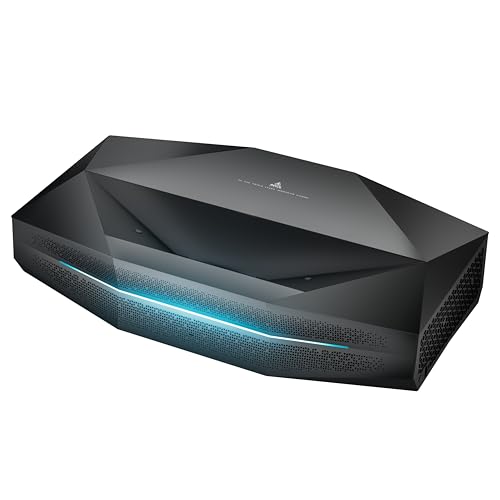
AWOL VISION Aetherion Pro 4K Ultra Short Throw Laser Projector
A 4K laser projector that throws a big picture from very close to the wall, with Google TV built in.
Product information
Our review: 4.3 out of 5
Product links
Plan for the screen surface too. A plain white wall works, but a dedicated projector screen usually gives a cleaner, more even picture. Check that the screen size matches the image size your projector can produce at the distance you have. Also think about where cables and power will run, and whether a ceiling mount needs drilling. Mounting hardware should be rated for the projector's weight, and if you are unsure about drilling into a ceiling, a licensed installer is the safer route.
Soundbars and speakers also change the room layout. A projector often needs a spot for a separate audio setup, so decide early whether you want a soundbar under the screen or a standalone speaker. The Sonos Ray Compact Soundbar for TV and Music in Black is one option that fits neatly under a TV, but for a projector you will need to choose a spot that does not block the beam path.
Brightness, Picture Quality and Viewing Distance
Brightness is where a projector and a TV really split apart, and it matters more than most people expect. A TV makes its own light, so it can stay bright even when sunlight pours through the window. A projector bounces light off a surface, and that light has to fight whatever is already in the room. The brighter the projector and the darker the room, the better the picture looks. If you plan to watch in a sunny living room, a projector will likely look washed out unless you can close the curtains or pick a time of day when the room is dim.
Look for the brightness rating on the spec sheet, usually listed in ANSI lumens. Be careful here, because different makers measure brightness in different ways, so two numbers that look the same may not be equal. The safest move is to compare models from the same maker, or to read the fine print on how the number was measured. Also check whether the number is for the brightest setting, which often looks harsh, or for a more balanced mode you would actually use for movies.
Picture quality is a different question, and it covers things like color, contrast and sharpness. Projectors can show very large images with good detail, but black areas often look grayer than they would on a good TV, especially in a room that is not fully dark. Resolution matters too. A 4K projector can show finer detail on a big screen, though how sharp it looks also depends on the content you watch and how far you sit from the surface. Some people find that streaming a lot of older shows makes the extra resolution less noticeable.
Viewing distance is where many people get surprised. On a TV, you pick a seat based on screen size, and a common rule is to sit back far enough that the picture fills a comfortable part of your view without feeling too close. A projector works the same way, but you can also change the image size by moving the box or adjusting the lens, so the picture can grow or shrink. Think about your favorite seat first, then work backward to see what picture size and projector distance fit. That way the image fills the view you want without you sitting uncomfortably close.
- Test the room at the time you plan to watch, morning, afternoon and night, if you can.
- Check the brightness mode you will actually use, not just the highest setting.
- Sit in your planned seat and picture a screen that size on the wall before you buy.
- Leave some room behind the seating for the box, and keep the beam clear of people walking past.
Pros
- A projector can throw a picture much larger than most TVs, so it suits a big wall and a movie-night feel.
- Projectors take up little floor space because the unit can sit on a shelf, table, or ceiling mount while the screen stays on the wall.
- A projector picture can look like a huge cinema screen, and you can swap screen sizes by moving the unit closer or farther from the wall.
- Many projectors have built-in streaming apps or accept a streaming stick, so you can watch shows without a separate box.
- Projectors usually cost less than a TV of the same screen size, which makes them a practical option for a big picture on a budget.
Cons
- Projectors need a dark room to look their best, since even a little daylight or lamp light can wash out the picture.
- Projected images depend on the screen or wall behind them, and a bumpy or light-colored wall can make the picture look dull or uneven.
- Projectors usually need more setup than a TV, including finding a spot for the unit, lining up the image, and adjusting focus.
- Bulbs and lamps wear out over time, and replacing them can cost more than you might expect, so check the maker's manual for lamp life on your model.
- Projectors generally struggle to match the brightness of a TV in a room with lots of windows, so they work best when you can control the light.
Picking the Right One for Your Room
Picking the right one really comes down to three things: how dark your room gets, how big a picture you want, and how much setup you're willing to do. Start by writing down what your room looks like at the time you'll actually watch. If the afternoon sun hits the screen wall, a TV will probably serve you better. If you can make the room dim at night, a projector has a lot more to offer.
Next, think about the seat you use most. Sit there, look at the wall, and picture the picture. Then compare that to the box. A TV is usually the easier pick for a tight living room, a bedroom, or a space where people walk through the middle of the room a lot. A projector shines best when you have a clear run of floor between the seat and the wall, and enough room behind the couch for the unit to sit on a shelf or table.
Ask yourself how often you'll rearrange things. A TV stays put and turns on fast. A projector often needs a quick warm-up, a little focus tweaking, and a check that the image is square on the wall. If you like the idea of a movie night that feels special, that extra ritual is part of the fun. If you want something you can flip on for the news while you make coffee, a TV will feel a lot less fussy.
Finally, look at what you already have. If you own a good soundbar or speakers, check whether they'll fit your setup, since a projector may need the audio gear placed somewhere that does not block the beam. Many people end up happiest with the option that fits their room and habits, not the one with the biggest number on the box. When in doubt, pick the setup you can picture using every week.
Wait, that broke the no colons rule. Corrected version
Gaming is a place where the two options can feel very different, so check it before you buy. Most TVs and projectors have a game or low-latency mode that cuts down on the processing that delays the picture. Turn it on in the settings menu and look for it in the manual, because the name changes from maker to maker.
Projectors have fans and lamps or light engines that push out warm air. Keep the vents clear on all sides, and don't tuck the unit into a closed cabinet or against a wall with nothing around it. Heat can shorten the life of the unit and may cause it to shut itself off. Give it open air and follow the spacing in the maker's manual.
Fan noise is worth a listen during a store demo or a review video if you can find one. In a quiet room the sound can be noticeable during dialogue scenes. Placing the unit a bit farther from your seat or on a stable surface can help, and some models have an eco or quiet mode that runs the fan more gently, though it usually trades off some brightness.
The wall behind the picture matters more than many people think. A plain white wall works fine for casual watching, but dedicated projector screens are made to reflect light more evenly and can make the picture look cleaner. If your budget is tight, a smooth, flat, light-colored wall is a good start. Just avoid wallpaper, textured paint, or a spot where a window glare hits the surface.
Where to Start With Projector or TV
A TV and a projector both put a picture in front of you, but they get there in very different ways. A TV is a flat panel you mount or stand in place. A projector is a box that throws light onto a wall or a screen. That one difference shapes almost every choice you'll make, so start there.
Before you look at any specs, answer three quick questions. Where will the picture go? When will you watch most? And how much hassle are you willing to deal with? If the honest answer to the first one is a bare wall with no spot for a box, or the second one is "mostly in the afternoon," a TV is usually the simpler call. If you can pick a clear wall, watch at night, and enjoy a bit of setup, a projector opens up a lot of possibilities.
A quick way to start:
- Measure the wall you'd use, both width and height, and write it down.
- Note the seat you use most and how far it sits from that wall.
- Check whether there's a shelf, table, or ceiling spot where a projector could sit with open air around it.
- Think about the shows and games you'll watch most, since that affects how much picture detail and speed you'll notice.
If the list points to a dim room, a clear wall, and a fair amount of floor space, a projector is worth a closer look. If it points to a busy room with lots of light, a TV will likely feel less work day to day. Either way, you'll be happier with the one that matches how you actually live in the room.
If you're leaning toward a projector and want a compact unit that's easy to move around, one option on the list is the Q100 Mini Projector with 4K Support and Electric Focus. The name tells you the key details, so compare those against your wall and seat before deciding.

Q100 Mini Projector with 4K Support and Electric Focus
A compact short throw projector that throws up to a 200 inch image from close range.
Product information
Our review: 3.5 out of 5
Product links
Screen Size and Room Setup
A projector's picture size comes from how far the unit sits from the wall, so the room layout matters more than the box. Start by measuring the wall you plan to use, then sit in your main seat and check how far away that seat is. That gap is your throw distance, and it tells you whether the room can handle a big picture.
Before you buy, check the throw ratio or throw distance range in the product listing or the maker's manual. Those numbers tell you how far back the unit needs to be for a given screen width. If your couch is too close to the wall, a short throw or ultra short throw model may fit better. If you have plenty of depth, a standard lens will work with more placement options.
Do a quick mock-up before you commit. Tape a rectangle on the wall at the screen size you want, then use painter's tape or a sheet of paper on a stool to mark where the unit would sit. Look at the rectangle from your seat. Many people find a picture that looked huge in their head feels just right in real life, or the reverse. If you can, leave the tape up for a few days and see how it feels at different times.
TVs ask for a different kind of planning. Pick a size based on how far you sit, since a screen that is too big for the room can make you turn your head too much. Measure the space on your stand or wall bracket first, and make sure your power outlet and cable path work. Mounting a TV on a wall is a job that calls for the right bracket and a stud finder, and TVs are heavy, so it is fine to ask a friend to help or to hire someone if you are not comfortable with it.
Watch for hazards in either setup. Keep cords out of walkways so nobody trips, and keep the projector or TV away from water and heat sources. Make sure any ceiling mount is installed firmly into solid structure, using the hardware the maker supplies and following its instructions. If you are unsure how a ceiling install should be done, check the maker's manual or ask a qualified installer, and do not try to hang heavy gear from a light fixture or drywall anchor.
Brightness, Picture Quality and Viewing Distance
Brightness is where projectors and TVs really pull apart. A TV makes its own light from the screen itself, so it stays bright even when the room has lamps on and the blinds are open. A projector has to throw its picture onto a wall, and that picture has to compete with whatever light is already in the room. Pull the curtains and dim the lights, and a projector looks great. Leave the afternoon sun pouring in, and the picture can wash out fast.
Look for the brightness rating in the product listing, and pay attention to the unit it is measured in. Projector makers often list lumens, while some list ANSI lumens, which is a more standard way to compare. Don't compare a number from one brand with a number from another unless you know the measurement method matches. The listing or the maker's manual will tell you what they used. A brighter projector helps in a room with some ambient light, but it does not fix a bad room. Dark walls, glossy paint, and a sunny window will still hurt the image.
Picture quality depends on more than the resolution label. Contrast is a big one, because it decides how deep the blacks look. TVs usually win here, especially in a dim room, since they can dim or switch off parts of the screen. Projectors can look soft or greyish in the dark parts of a movie if the room is not fully dark. Color and sharpness vary by model, so read reviews from people who describe what they saw rather than trusting the spec sheet alone.
Viewing distance decides how much detail you actually notice. Sit too close to a large TV and you can see the individual pixels or feel like the picture is filling your whole field of view, which some people love and others find tiring. For a projector, the screen is usually larger and the picture softer at the edges if you are very close to the wall. A handy habit is to sit where the picture fills a comfortable part of your vision and not so much that you have to move your head to follow the action. Test that distance with your mock-up before you settle on a size.
Pros
- A projector can throw a picture 100 inches or more across a wall, which is hard to match with a TV at a similar price.
- Projectors take up very little floor or wall space since the unit can sit on a shelf or table, while a big TV needs a stand or a wall mount.
- Because the image is cast on a surface, you can pick a screen size that fits your room and change it later without buying a new display.
- Projectors work well in rooms where you want to keep the picture off the walls when it is not in use, since the unit can be packed away or tucked into a cabinet.
- Many projectors have built-in streaming apps or can take a streaming stick, so you can watch shows without a separate player.
Cons
- Projectors need a dark room to look their best, since ambient light washes out the picture and makes colors look faded.
- Projected images depend on screen placement, so you need enough wall space and a reasonable throw distance to get a good size.
- Projector bulbs or light sources wear down over time, and replacement parts can add to the cost of ownership.
- Most projectors need more setup than a TV, including focus, keystone adjustment, and finding a spot where the fan noise stays out of the way.
- A projector picture can look dimmer than a TV in a bright room, so daytime viewing is often a letdown.
Picking the Right One for Your Room
Start with the room you actually have, not the one you picture in your head. Think about when you watch most. If it's movie nights after dark, a projector has a lot going for it. If you flip on the TV during a sunny Saturday afternoon, a TV is the safer bet.
Pick a few things you can check quickly:
- Do you have a spot where the blinds or curtains close fully?
- Is there a clear, flat wall that isn't covered in shelves, art, or a window?
- How much floor or wall space can you give up for a stand, bracket, or shelf?
- Will anyone else in the house want to watch something different at the same time?
If you answered yes to the first two, a projector deserves a real look. If the room is bright most of the day, or you watch with the lights on, a TV usually makes life easier.
Budget matters too, but look past the sticker price. A projector can need a separate screen or a painted wall, and some models use a light source that eventually needs replacing. A TV is more of a plug-in-and-go purchase. Ask yourself whether you'd rather spend on the display or on the setup around it.
Finally, think about who sets things up and who moves them. A projector that lives on a shelf and gets packed away after a movie is a good match for a shared space or a renter. A TV mounted in one fixed spot suits someone who wants a permanent setup and doesn't plan to move things around.


