
A projector throws a big picture onto a wall or screen, so the room matters as much as the machine itself. The same projector can look great in one space and wash out in another. Before you compare models, think about where it will sit, how you'll watch, and what kind of light is already in the room.
Start with how you'll use it. Movie nights in the dark are a different job than sports or video games with the lights on. Ask yourself these questions:
- Will it live in one spot, or do you need to move it between rooms?
- Will you mount it on the ceiling, or set it on a shelf or table?
- Do you already have a screen, or will you use a plain wall?
- Do you want built-in streaming apps, or will you plug in your own device?
Projector types vary a lot. A standard projector usually sits farther from the wall, which can be tricky in a small living room. A short throw or ultra short throw model sits much closer, so it can work in tighter spaces, but placement and screen choice matter more. A small portable mini projector is handy for trips or bedrooms, though it usually won't give you the same picture size or brightness as a larger home cinema unit. Read the product title and listing carefully so you know which category you're looking at.
Think about sound too, because most projectors have small built-in speakers that don't do much for movies. Many people pair a projector with a soundbar or a small speaker setup. If that's your plan, check that the audio connection options match what your projector offers, such as an audio output or a Bluetooth option. The maker's manual will list which ones it supports. Also, keep the vents clear and give the unit some breathing room, since projectors get warm while running and blocked airflow can cause overheating.
When you know your setup and use, you'll be able to narrow the field fast. The next steps cover your room's size and how bright your lights are, which make the biggest difference to what you actually see on screen.
Figuring Out How Big Your Room Really Is
Before you look at any projector, grab a tape measure. The space you have decides which kinds of projectors make sense, and it's easy to fall in love with a model that won't fit where you want it.
Start with the wall or screen you plan to use. Measure its width and height, and note how much clear space sits around it. Furniture, windows, and doors all count. A picture that spills over a window frame or cuts into a bookshelf usually looks off.
Next, measure from the wall to the spot where the projector would sit. This is the throw distance, and it's the number that matters most. A projector's throw ratio tells you how far it needs to be from the screen to fill a given width. The maker's manual or spec sheet should list that ratio or a throw distance chart. If it doesn't, don't guess. Look for the chart before you buy.
Here's a simple way to plan it:
- Measure the distance from the wall to the projector spot.
- Find the throw ratio in the manual or chart for the model you're considering.
- Check that the picture width it makes will fit your wall.
- Make sure the projector sits where you can reach the power outlet and the cords won't stretch across walkways.
Short throw and ultra short throw units, such as the AWOL VISION Aetherion Pro 4K Ultra Short Throw Laser Projector, are built to sit much closer to the wall, so they can fit a smaller room. That closeness is handy, but it also means a bit of bumping or shifting can move the picture, so pick a stable surface. If you're mounting a projector on the ceiling, measure the height and check where the ceiling joists or mounting points sit. Use a sturdy step stool or ladder, have someone hold it, and don't stand on chairs or boxes. If you're not sure about the mount or the wiring, a pro install is the safer call.
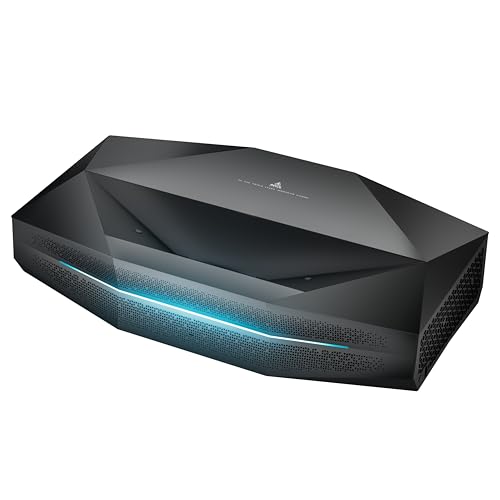
AWOL VISION Aetherion Pro 4K Ultra Short Throw Laser Projector
A 4K laser projector that throws a big picture from very close to the wall, with Google TV built in.
Product information
Our review: 4.3 out of 5
Product links
Finally, leave room for airflow and for you. Keep the lens and vents clear of walls and curtains, and don't stack anything on top of the unit. Measure your seating too. If the couch sits too close, the picture can feel overwhelming, and if it's too far, the details get lost.
Brightness and Lumens for Your Lighting
Brightness on a projector is measured in lumens, and you'll often see the number written as ANSI lumens in the listing. That number tells you how much light the projector throws, but it doesn't tell you how good the picture looks in your room. The light in the room matters just as much.
Start by thinking about when you'll watch. If it's mostly movies after dark, a moderate brightness is usually enough. If you want to watch sports in the afternoon or play games with the blinds open, you'll need more light output, and you'll also need to block some of the daylight. Some useful steps:
- Close the curtains or blinds, and turn off any overhead lights that shine on the wall or screen.
- Look at where the lamps sit. A lamp pointed at the wall behind the screen can wash out dark scenes.
- If you have dimmers, set them low for movies and bring them up for everyday use.
- Check the wall color. Bright white walls reflect more light, while dark or colored walls can make the picture look dull.
The Pemoon Smart 4K Projector with Google TV Stick lists 3000 ANSI in its title, so it's one example of a model whose rated brightness is stated up front. A rating like that is a good starting point for comparing models, but only compare numbers from the same type of rating. Different makers use different methods, so a number from one brand doesn't always line up with another. When in doubt, check the maker's manual or spec sheet for how the brightness was measured.

Pemoon Smart 4K Projector with Google TV Stick, 3000 ANSI
A portable projector with Google TV built in, so you can stream movies and shows without plugging in another box.
Product information
Our review: 3.8 out of 5
Product links
Your screen also changes how bright things look. A plain wall spreads the light out, while a dedicated projector screen is designed to reflect it back toward your seats. Some screens are made with a higher gain, which can make the picture look brighter, but they can also make the view narrower for people sitting off to the side. If you're using a wall, a smaller picture often looks brighter than a huge one, because the same light is spread over less area.
Projectors are bright, and that brings a real hazard. Don't stare into the lens or the beam, and keep the unit out of sight lines where someone might look straight into it. Keep the vents clear, because the light source gives off heat that needs somewhere to go. If you're hanging the unit up high, a ceiling mount with a proper locking setup is the way to go, and the maker's manual will tell you what the mount needs.
Pros
- A projector can throw a very large picture, often much bigger than any TV you would fit in the same room.
- Projectors take up little wall or shelf space, since the unit can sit on a table or ceiling mount while the screen stays flat against the wall.
- Many projectors are made to sit far from the wall or close to it, so you can often pick a model that fits the layout of your room.
- Some models include built-in streaming apps, which means you can watch shows without plugging in a separate device.
- Short throw and ultra short throw projectors can sit close to the screen, which helps keep shadows from people walking past the beam.
Cons
- Projectors look best in a dim room, so a bright living room with lots of windows can wash out the picture.
- The image size depends on how far the projector sits from the wall, which means you need open space behind the unit to get a big picture.
- Projector bulbs and lamps wear down over time, and replacing them can cost real money down the road.
- Most projectors need a screen or a smooth white wall to look their best, so a bumpy or colored wall can hurt the image quality.
- Projector fans can make some noise, which may be noticeable during quiet movie scenes if you sit close by.
Final Checks Before You Buy
Before you add anything to your cart, pull up the full spec sheet for the exact model, not just the listing photo. The spec sheet is where you confirm the input ports, what comes in the box, and the warranty terms. Make sure the ports match the devices you already own, like a streaming stick, game console, or cable box.
Next, read the return policy and warranty details from the seller. Know how long you have to send something back, who pays shipping, and what happens if the unit arrives damaged or doesn't work. Keep the box and packing material until the return window closes, since many sellers want the original packaging.
Check what's actually in the box. Some projectors ship with a remote, a power cord, and a lens cover, while others expect you to buy extras. Compare the listing's bundle to the spec sheet, and check whether the remote takes batteries. If the Q100 Mini Projector with 4K Support and Electric Focus is on your shortlist, its title says it has electric focus, so read the manual to see how that adjustment works before you buy.
Think about sound last, since projector speakers are usually small. If you want a soundbar, the Sonos Ray Compact Soundbar for TV and Music in Black is one option from this store. Confirm how it would connect to your projector or streaming device, because not every projector has the same audio outputs. Check the manual for both products before you order.

Sonos Ray Compact Soundbar for TV and Music in Black
A compact black soundbar that handles TV dialogue and music, set up with just two cables and the Sonos app.
Product information
Our review: 4.2 out of 5
Product links
Wait, that output included the article title as the first line, which the instructions didn't ask for. Here is the corrected list of exactly six titles
Your room size sets how big the picture can get, so start with a tape measure. Measure from the wall where the screen will go to the spot where the projector will sit. Then check the spec sheet for the throw distance or throw ratio the maker lists, since that tells you the picture width at that distance.
Painter's tape makes a quick preview. Once you know the width, tape a rectangle of that size on the wall, sit in your usual spot, and see whether it feels right. If the tape ends up near a door frame, a window, or a corner, you'll know to adjust before you buy.
Test your light at the hour you'll actually watch. Sit in your usual seat at dusk and again after dark, and notice where glare lands on the wall. A window on the wall opposite the screen is the usual trouble spot, so a blind or a curtain on that side can make a big difference. Pale floors, a light ceiling, and glossy furniture can also bounce light back toward the screen, so keep an eye on those too.
On the plus side, a projector gives you a big picture from a small footprint, and some models include built-in streaming, so you may not need a separate device. The Epson Home Cinema 2350 4K PRO-UHD Smart Streaming Projector is one example from this store whose title lists both 4K and smart streaming. The downsides are real, though. You'll likely need a darker room than a TV needs, and setup takes more patience, since you'll tweak focus, keystone, and placement. If your room gets lots of daylight or you want a bright picture at any hour, a TV may suit you better.

Epson Home Cinema 2350 4K PRO-UHD Smart Streaming Projector
A bright 4K projector with built-in Android TV, so you can stream your shows without plugging in a box.
Product information
Our review: 4.2 out of 5
Product links
Getting Started With Your Room Size
Room size affects two things: how large the picture can get and how far your seats sit from it. Those two numbers decide whether the projector feels roomy or cramped.
Start by sketching your room on paper, even a rough one. Mark the doors, windows, outlets, and where your sofa or chairs sit. Outlets matter more than most people expect. If the nearest one is across the room, you'll be tempted to run an extension cord along the floor. That's a trip hazard, and a cord that gets pinched or overloaded can overheat. Plan the projector spot so its power cord reaches a wall outlet directly.
Next, picture the seats you'll really use, not the ideal spot. A row of chairs against the back wall can make it hard to place the projector without someone walking through the beam. Leave a clear path between the projector and the screen so people can get up and move around without casting shadows on the picture.
Check the space around the unit too. Projectors need clear air around their vents, so keep them away from curtains, bookshelves, and cabinets that could trap heat. If you plan to mount the unit on the ceiling, you'll be working overhead. Use a stable ladder, have a second person steady it, and follow the mount maker's instructions closely.
If your room is small and you can't put the projector far from the wall, look for an ultra short throw model. The AWOL VISION Aetherion Pro 4K Ultra Short Throw Laser Projector from this store is one example, and its title says it's an ultra short throw laser projector. That kind of model is built to sit close to the screen. Check the spec sheet for the exact distance it needs before you plan your layout.
Figuring Out Brightness for Your Lighting
Brightness is the number people look at first, but it's easy to misread. Projector makers often list brightness in lumens, and the number only means something when you know how it was measured. Look for ANSI lumens on the spec sheet. That's a more consistent measurement, so it's the best way to compare two models side by side. If a listing just says "lumens" with a big number and no measurement method, treat that number with caution.
The Pemoon Smart 4K Projector with Google TV Stick lists 3000 ANSI in its title, so it's a handy reference point when you compare other models that show their brightness the same way. Keep in mind that a brighter projector doesn't automatically mean a better picture. Brightness gets spread across the screen, so a much bigger image looks dimmer than a small one from the same unit.
Your lighting plan matters more than the spec number. Pick the lamps you'll actually use during a movie. A dimmer switch on the overhead light lets you lower it without turning it off, which is handy for keeping the room comfortable. A lamp placed behind the seating area, pointed at the wall or ceiling, gives you soft light without shining onto the screen. Just make sure any lamp cord runs along the wall, not across the floor where someone could trip on it.
- Set your light level with the room as you normally use it, not in a dark test.
- Use warm, low-output bulbs for background light, and avoid bright, cool daylight bulbs near the screen.
- Turn off any lights that shine directly on the screen during viewing.
- Check that bulbs and fixtures are rated for the lamp type you plan to use, and follow the maker's instructions for the fixture.
Finally, think about the screen surface. A proper projector screen reflects light more evenly than a plain wall, which can help the picture look brighter and less washed out in a room with some ambient light. You don't need a screen to start, but if your room is never fully dark, it's worth comparing a dedicated screen with the wall you already have. Check the maker's guidance on screen choice for the model you're considering, since recommendations differ depending on the projector and room.
Pros
- A projector can throw a very large picture, often much bigger than a TV you would fit in the same spot.
- Projectors take up little wall or shelf space, since the picture comes from the unit itself and the screen can be a plain wall or a pull-down screen.
- Many projectors have built-in streaming apps, so you can watch shows without plugging in a separate player.
- Short throw and ultra short throw models can sit close to the wall, which helps when you have people walking through the room or small kids around.
- Swapping the lamp or light source is not usually needed with laser models, which tend to need less routine upkeep than older lamp-based projectors.
Cons
- Projectors look best in a dim room, so a bright living room with lots of windows will wash out the picture.
- Projected images need a blank wall or a screen, and you may have to find a spot for the unit that does not block anyone's view.
- Short throw and ultra short throw models cost more than basic projectors, and the price climbs with the throw distance you want.
- A projector puts out less light than a flat-screen TV, so the picture can look dim if the room gets sunlight during the day.
- Fan noise is common on projectors, and it can be noticeable during quiet scenes unless you place the unit a bit away from your seating.
Final Checks Before You Buy
Your projector's final spot should be checked at the time of day you actually watch. Set it up, then look at the wall in the evening with the lights you normally use, and again after dark. You may spot a glare or a hot spot you missed during the day.
Before you click buy, run through this quick list:
- Measure the throw distance from the spot you picked to the screen wall, then compare it with the range in the maker's spec sheet.
- Confirm the screen size you want fits the wall with a little margin on each side.
- Check the input ports you need, like HDMI for a streaming stick or game console, and make sure you have a cable or adapter.
- Look up the warranty terms and the return policy for your region, since these vary.
- Think about where the remote will live and whether you need a spare battery on hand.
Pay attention to the fan noise listed in the reviews you read, but also test it yourself at home if you can. A unit that sounds fine in a store can feel loud in a quiet room. Placing it a bit farther back or on a shelf with some padding can help, as long as you still keep the vents clear.
If you're pairing the projector with a soundbar or speakers, check that the audio output options on the projector fit your setup. Many people find the built-in speakers are fine for casual viewing but not great for movies, so plan your audio before you commit.


