
A home theater doesn't have to cost a fortune to feel great. Most people start with one main piece, usually the TV or projector, and add sound later. That's a smart way to spread the cost out, as long as you know which piece matters most for your room.
Before you shop, make a short list of what you actually watch. If it's mostly sports and news, a clear screen and decent speakers beat fancy extras. If you love action movies, sound quality will probably matter more to you than a slightly sharper picture.
Here are a few ways to keep costs down:
- Decide your budget first, then split it roughly between picture and sound.
- Choose an all-in-one system if you want a simple setup with fewer boxes and cables.
- Buy a receiver or speaker package and upgrade one part at a time later.
- Check the box for what's included, like speakers, a subwoofer, or Bluetooth, so you don't pay twice for the same thing.
If you're thinking about a projector, the Yamaha YHT-4970U 5.1 Home Theater System with Dolby Atmos is one example of a package that bundles speakers and sound in one purchase. Read its listing closely to see exactly what comes in the box. For a projector setup, a BenQ TH671ST 1080p Short Throw Home Theater Projector is the kind of short throw model that lets you place the projector close to the wall, which can help in smaller rooms. Measure your space before you buy either one.

Yamaha YHT-4970U 5.1 Home Theater System with Dolby Atmos
A full surround package with the receiver, five speakers and a subwoofer already in one box.
Product information
Our review: 4.2 out of 5
Product links
Cheap electronics still run warm, so keep vents clear and don't stack components with no airflow. Use a surge protector for your gear, and keep cables away from water and heavy foot traffic.
Picking the Right TV Size for Your Room
A TV that's too big for your room can feel like sitting in the front row of a stadium. One that's too small can make you squint from the couch. Getting the size right matters more than most people expect, and it doesn't cost anything to figure out.
Start by measuring the distance from your seat to the wall where the screen will sit. A common rule of thumb for TVs is to sit roughly 1.5 to 2.5 times the screen's diagonal away, but the right number depends on how sharp the picture is and how close you like to sit. Check the maker's guidance on viewing distance for the model you're considering, since it varies by brand and resolution.
Here's a quick way to narrow it down:
- Measure the wall space, not just the TV stand. Leave room for the frame and some breathing space on each side.
- Note how far your couch sits from that wall.
- Think about who sits where. A bigger screen helps the back row, but people up front may feel like they're too close.
- Make sure the stand or wall mount you plan to use fits the TV's size and weight. The box or the maker's manual will list what it supports.
Projectors work differently. You pick the screen size based on how far the projector sits from the wall, and the throw distance on the spec sheet tells you how big the image gets. Tape a sheet of paper or a blanket on the wall where the screen would go and measure it. That gives you a real sense of scale before you buy anything.
Last thing: if you're bringing a projector into a room with bright windows, plan on dimming the room or hanging blackout curtains. Image size is only part of the picture. The room's light decides how good that picture actually looks.
Choosing a Soundbar That Actually Sounds Good
Most soundbars look nice on a store shelf, but the real test is how they sound in your living room. A good starting point is to figure out what kind of sound you want. If dialogue gets lost under music or explosions, look for a model that clearly lists a center channel or a dialogue mode. If you like to feel the rumble of a movie, a subwoofer matters more than a bigger bar. Pick the one that fixes your biggest annoyance.
Before you buy, check how wide the bar is. It should sit under the TV without hanging past the edges, and you want it to line up with where your ears will be. A bar that's too long for the stand can look sloppy and sometimes blocks the TV's remote sensor or the IR eye. Measure the stand first, then compare it to the bar's width listed on the box.
Connections are the next thing to check. Look at what your TV has. Many people use an HDMI connection with ARC or eARC, which lets the TV send sound to the bar using one cable. If your TV has no ARC port, you may need an optical cable or a Bluetooth link instead, and Bluetooth can add a little lag that makes lip-sync look off. Check your TV's manual for the exact ports it has before you commit to a bar.
If you want a full surround feel without the clutter of extra speakers, a 5.1 or 7.1 home theater system is one way to go. Those packages put speakers around the room, which works best when you have space to place them. For example, the Fluance Elite SX71BR 7.1 Home Theater Speaker System Black Ash is a seven-channel speaker package, so you'll need room for more speakers and enough wall or stand space to place each one. The Pyle PT796BT 7.1-Channel Bluetooth Home Theater Receiver is a receiver, so it pairs with speakers you already own or plan to buy.
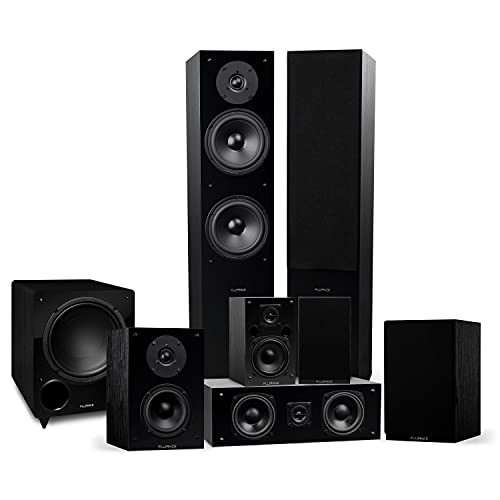
Fluance Elite SX71BR 7.1 Home Theater Speaker System Black Ash
A full seven speaker surround kit with a 10-inch powered subwoofer and black ash woodgrain cabinets.
Product information
Our review: 4.2 out of 5
Product links
Last tip: a soundbar you can hear clearly at a comfortable volume beats a louder one that makes you reach for the remote every few minutes. Play a scene you know well, with quiet talking and loud action, and adjust from there.
Pros
- A home theater system bundles speakers, a receiver and often a subwoofer into one purchase, which usually costs less than buying each piece separately.
- Pre-matched packages are designed so the speakers work together, so you skip the guesswork of mixing parts from different brands.
- A 5.1 setup gives you surround sound for movies and games in a room that doesn't need a lot of floor space.
- Bluetooth on many systems lets you stream music from your phone without running extra cables.
- You can start with a basic system and add a subwoofer or extra speakers later as your budget allows.
Cons
- Budget home theater packages often ship with smaller speakers and a basic subwoofer, so bass and volume headroom can fall short in a big room.
- Bundled systems usually include only the speakers and receiver, which means you may still need to buy a TV, a Blu-ray or streaming source, and proper speaker cables.
- All-in-one kits can be tricky to place, since the five or more speakers each need a spot, and rooms with awkward layouts make that harder.
- Cheaper receivers may have fewer HDMI inputs and older connection standards, which can limit how many devices you can hook up at once.
- Sound quality on low-cost kits can sound harsh or muddy at high volume, and the built-in settings may not offer much room for fine-tuning.
Final Tips for Getting the Most Out of Your Setup
Your home theater will sound and look better once it's set up with a little care, and most of that doesn't cost a thing. Start by sitting in your main seat and playing a movie you know well. Listen for dialogue, check whether the picture looks washed out, and notice if anything feels off. Those few minutes tell you more than any spec sheet.
Speaker placement makes a bigger difference than most people expect. If you're using a 5.1 or 7.1 package, aim the front speakers toward your ears at about the same height as your seat. Keep the subwoofer out of corners if you can, since corners often make bass sound boomy. Try a few spots and listen from your couch each time. You'll be surprised how much a foot or two can change things.
Picture settings are another quick win. Many TVs ship with a vivid or store mode that looks bright on the sales floor but overdoes the colors at home. Look for a cinema, movie, or calibrated mode in the menu and try that instead. Dim the lights a bit when you watch, and keep bright lamps out of the screen's reflection. If you're using a projector, the same idea applies: less room light means a richer image.
Finally, treat the setup as something you tune over time. Check the sound settings on your TV and receiver for options like night mode or dialogue boost, and use them when you need them. Keep the firmware updated if the maker offers updates, and follow the steps in the manual for doing it safely. Write down the settings that work for you so you can get back to them after a power outage or a factory reset.


